JPG vs PNG for a Transparent Background
PNG is better for a transparent background, because JPG cannot store transparency at all. Use PNG whenever the cut-out has to sit on other backgrounds. Use JPG only when the background is fixed, such as pure white, and you want a smaller file. To get a real transparent PNG, remove the background from your photo and keep the output on Transparent PNG.
What does each format keep?
The difference comes down to one feature. A PNG can carry an alpha value for every pixel, which marks it as solid, partly see-through or fully see-through. A JPG has only color. Our guide to how a transparent PNG works covers the alpha channel in detail.
MDN's image format guide states it plainly: "JPEG does not support an alpha channel." It adds that PNG is preferred over JPEG for more precise reproduction of source images, or when transparency is needed. The web.dev format guide lists the same split in its feature table: PNG transparency yes, JPEG transparency no. Both formats are universally supported, so neither one will fail to open in a browser or a common app.
| Question | PNG | JPG |
|---|---|---|
| Keeps a transparent background | Yes | No |
| Compression | Lossless | Lossy |
| Sharp edges, text and logos | Stay clean | Can blur or show colored fringes |
| Photographs | Work, at a larger file size | Usually fine, smaller files |
| Universally supported | Yes | Yes |
Is PNG better quality than JPG?
In one sense, yes. PNG is lossless, which means it reproduces the original exactly. JPG is lossy, which means it throws away some image data to get a smaller file. MDN says to prefer lossless encoding for screenshots, diagrams, logos and line art, because blurring and colored fringes around text and sharp edges are very visible.
That matters for cut-outs. The outline of a subject is a hard edge between the object and nothing, so MDN's warning about sharp edges applies to it. That is one more reason a cut-out belongs in PNG even before you count the transparency.
For a plain photograph the story is different. MDN notes that photographs and other continuous-tone images can usually tolerate lossy compression, because the discarded detail is harder to see. A product photo on a white background is still a photo, so a JPG of it can look as good as a PNG to the eye.
Which file is smaller?
Usually the JPG. web.dev says PNG produces the highest quality image, but at a cost of significantly higher file size than other formats, and recommends using it judiciously. For photos, it points to JPEG, lossy WebP or AVIF, and advises trying several JPEG quality levels to find the right balance between quality and size.
For a real example, we saved one of our own cut-outs, a 480 × 600 coffee cup, both ways. As a transparent PNG it came to 85,802 bytes (about 86 KB). As a JPG on white at quality 85 it came to 11,609 bytes (about 12 KB), roughly 7 times smaller. That is one image, and the gap depends on the picture, so if size matters, export both and compare the two files for your own image.
What happens to transparency when you save a PNG as JPG?
Nothing is preserved. Because JPG has no place to store an alpha value, the app has to replace each see-through pixel with a solid color before it writes the file. Some apps pick white and some pick black. The result is a flat rectangle with a colored background, and that copy cannot be turned transparent again by changing the extension or converting it back to PNG.
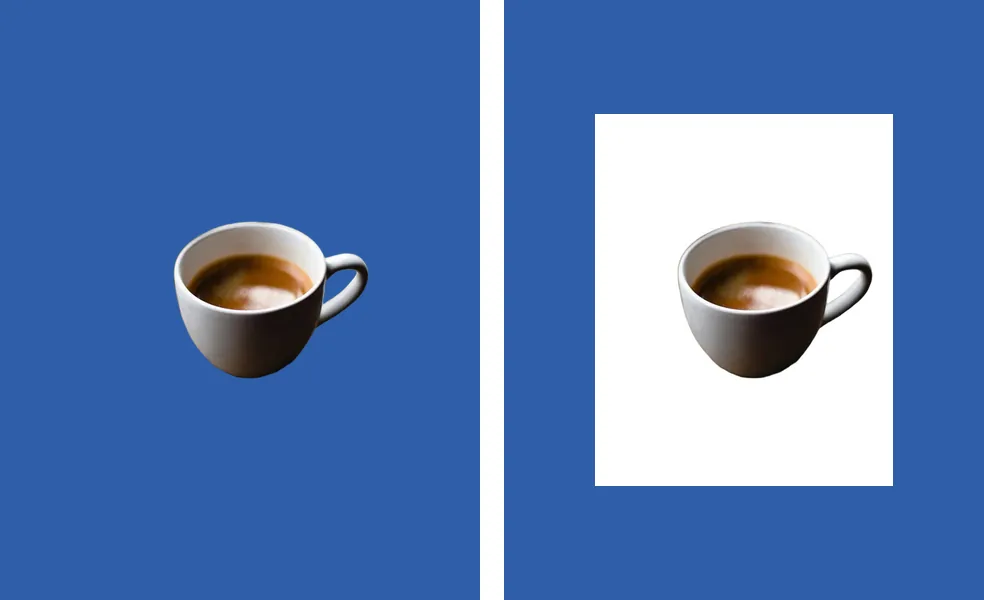
Our guide to why a transparent PNG turns black explains how that fill happens and how to tell it from an app that is only displaying the file badly. The rule that follows is simple. Keep your master cut-out as PNG, and make a JPG copy only when you need one.
JPG or PNG for each use
| Use | Pick | Why |
|---|---|---|
| Slides and mockups | PNG | The subject sits on a colored or patterned background, so the transparency has to survive |
| Website overlays and layered designs | PNG | The page shows whatever is behind the image |
| Store listing on white | JPG | The background is fixed, and a JPG is the smaller file |
| Logos, signatures and line art | PNG | Sharp edges stay clean, and you can place them on any background |
| Print layouts | PNG for the cut-out | Place it on the page in your layout app, and export the final page in whatever format the printer asks for |
The pattern behind the table is easy to remember. Transparency is a reason to choose PNG. A fixed, flat background is a reason to choose JPG. When both are true at different stages, as with a product that appears on a white listing today and on a colored banner next month, keep the PNG and export the JPG from it. That way you never have to cut the photo out a second time, and you never have to guess which copy still has its transparency.
Should product photos on white be JPG or PNG?
Here JPG is the practical choice. If the listing needs a pure white background, there is nothing left to make transparent, so the main advantage of PNG does not apply. A JPG with the white baked in is a smaller file and opens everywhere. Our marketplace presets for Amazon, Etsy, Shopify, eBay and Walmart save exactly that: a JPG on white.
Keep a transparent PNG of the same product if you will reuse it. It lets you put the product on a colored banner, a lifestyle scene or an ad later without cutting it out again. To get the white version fast, our white background tool for product photos cuts out the subject and saves the JPG. The free tier covers up to 40 images per batch.
Getting both from one cut-out
You do not have to choose before you start. In the PNG background remover, the AI cuts out the subject, and the Output menu sets what you download: Transparent PNG (the default), Transparent WebP, a white background JPG or a solid color. Photos are never uploaded. Run the batch once for the transparent PNGs, then again with a white background if you also need JPGs.
Transparent WebP is a third option that also keeps transparency. We cover it, and when it is worth using, in our WebP transparency guide. The short version: PNG is the safest choice when you are not sure where the file will end up.
Quick decision list
- The background must stay see-through: PNG.
- The background will be one flat color, such as white: JPG is fine and smaller.
- The image is a logo, signature, diagram or has text: PNG.
- You will reuse the subject on other backgrounds later: keep a PNG master.
- Unsure where the file will be used: PNG.
A PNG is also the format the W3C PNG specification describes as lossless and able to carry an optional alpha channel, which is why it is the default for cut-outs.