Why Does My White Background Look Gray in Product Photos?
A white background looks gray in product photos because the camera exposes the scene as if it were average in brightness, so a bright backdrop records darker than it is, and because the backdrop usually gets less light than the product, most of all at its edges. To get pure white, 255, 255, 255, light and expose the backdrop so it records at full white, or cut the product out and put it on pure white after the shoot. Check the result with a color picker, not by eye.
- Measure the backdropOpen the photo in an editor with a color picker and sample the backdrop in the corners and behind the product. Pure white reads 255, 255, 255. Anything lower is light gray to a marketplace.
- Brighten the exposureDial in positive exposure compensation until the backdrop is bright, while the product still shows its texture and color.
- Light the backdrop on its ownPut a light on the backdrop itself, separate from the light on the product, so the corners get as much light as the middle.
- Or replace the background afterwardCut the product out and fill the background with pure white. Every background pixel then reads 255, whatever the backdrop looked like.
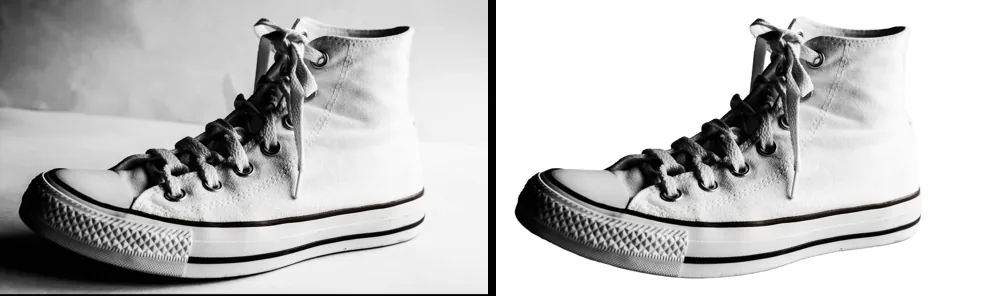
Why does a white backdrop come out gray?
A camera meters the light reflected by the scene and picks an exposure for an average scene. Wikipedia's article on light meters explains that reflected-light meters are calibrated for "average" scenes, and that a scene full of light colors leads the meter to underexpose. Every meter built into a camera is a reflected-light meter.
A product on a white sweep is exactly that kind of scene. The meter sees a lot of bright backdrop, assumes the scene is brighter than average, and darkens the exposure to compensate. The article on exposure compensation gives the classic example: a scene with predominantly light tones, such as a white horse, often ends up underexposed. The white sweep becomes a light gray, and the product often looks a little dull too.
Why are the corners grayer than the middle?
Light spreads out as it travels. For a small light source, the inverse-square law says the intensity falls with the square of the distance, so a part of the backdrop twice as far from the light gets about a quarter of the light. With one lamp aimed at the product, the backdrop behind it and its corners sit farther away and come out darker. That is why a photo can have a bright patch behind the product and a gray band toward the edges.
The same goes for shadows. Anything the product blocks from the light, such as the floor of the sweep just behind it, records darker than the open backdrop.
How do you check that a background is pure white?
Use numbers, not your eyes. Light gray looks white on screen, especially next to a dark product, and screens differ in brightness. A color picker reads the actual pixel values. In GIMP, the free editor, the Color Picker tool can show the color of the pixel you click in an information window without changing anything.
Sample at least four places: two corners, an edge, and the backdrop right next to the product. Pure white is 255 for red, 255 for green and 255 for blue. A reading such as 236, 236, 236 is light gray, even if the photo looks fine to you.
What white do Amazon and Walmart ask for?
Both name the exact value. Amazon staff in the Seller Forums give the main image standard as pure white (RGB 255, 255, 255). Walmart's image guidelines ask for a main image on a seamless white background, 255/255/255 RGB. A backdrop at 230 does not meet either rule, however white it looked on set.
The rule covers the main image. The other images in a listing can show the product in use. The marketplace pages for Amazon and Walmart list the rest of each marketplace's requirements, with their sources.
Fix it at the camera, or after the shoot?
| At the camera | After the shoot | |
|---|---|---|
| What it takes | A separate light on the backdrop and careful exposure | A cut-out of each photo and a white fill |
| Works on photos you already took | No, you reshoot | Yes |
| Backdrop reads 255 everywhere | Only if every corner is lit evenly | Yes, every background pixel |
| Risk | Too much light washes out white or pale products | A rough edge on hair, fur or glass needs touching up |
Many sellers do both: they light the backdrop well enough that the product looks bright, then replace the background so it is exactly 255. A clean, bright original also makes the cut-out easier, because the product stands out clearly from what is behind it.
How to replace a gray background with pure white
Open the white background tool and drop in the whole shoot. The AI cuts each product out, and the White background output fills everything around it with pure white, #FFFFFF, before the JPG is saved. The free plan covers up to 40 photos per batch with no sign-up and no watermark, and the photos are never uploaded.
Check two things before you list. First, the edges: open Touch up (the pencil button) to erase leftover backdrop or restore a part that was cut away. Second, the edge pixels: JPEG compression can shift a few pixels along the product's edge by a shade, which is normal for the format, while the open background stays at 255. If you add the soft shadow option, the pixels under the product are gray on purpose, so leave it off when a marketplace wants nothing but white around the product.